
A music assistant for Ableton Live.
Drums, bass lines, chords, and melodies, written into your set and checked in Live. It also loads your instruments and effects, edits device chains, and exports MIDI with CC curves.
Ask the Assistant in plain words, run one of 14 workflows, or work out the harmony in the Chords window. Ohmic mirrors your Session and Arrangement, writes to the cell, track, or range you pick, or to new tracks you ask for, and leaves the artist's choices to you.
Everything Ohmic does.
One app beside Live. Each card jumps to the details.
Assistant in your set
Ask for parts, sounds, tracks, and edits in plain words. It can read your tracks, clips, and devices so what it writes fits your set.
14 workflows
Bass, drums, chords, melody, counter-melody, counterpoint, harmony, arpeggios, sequences, ambient textures, mockups, multitrack, and analysis.
Instant mode
Six workflows, Chords Generate, and key analysis run on your computer. Results repeat exactly, most with a seed you can change, with no LLM API key and no LLM token usage required.
Chords window
Palette with Roman numerals, More Chords, Circle of Fifths, five Sketches, Transforms, key analysis, and modulation bridges.
Session and Arrangement
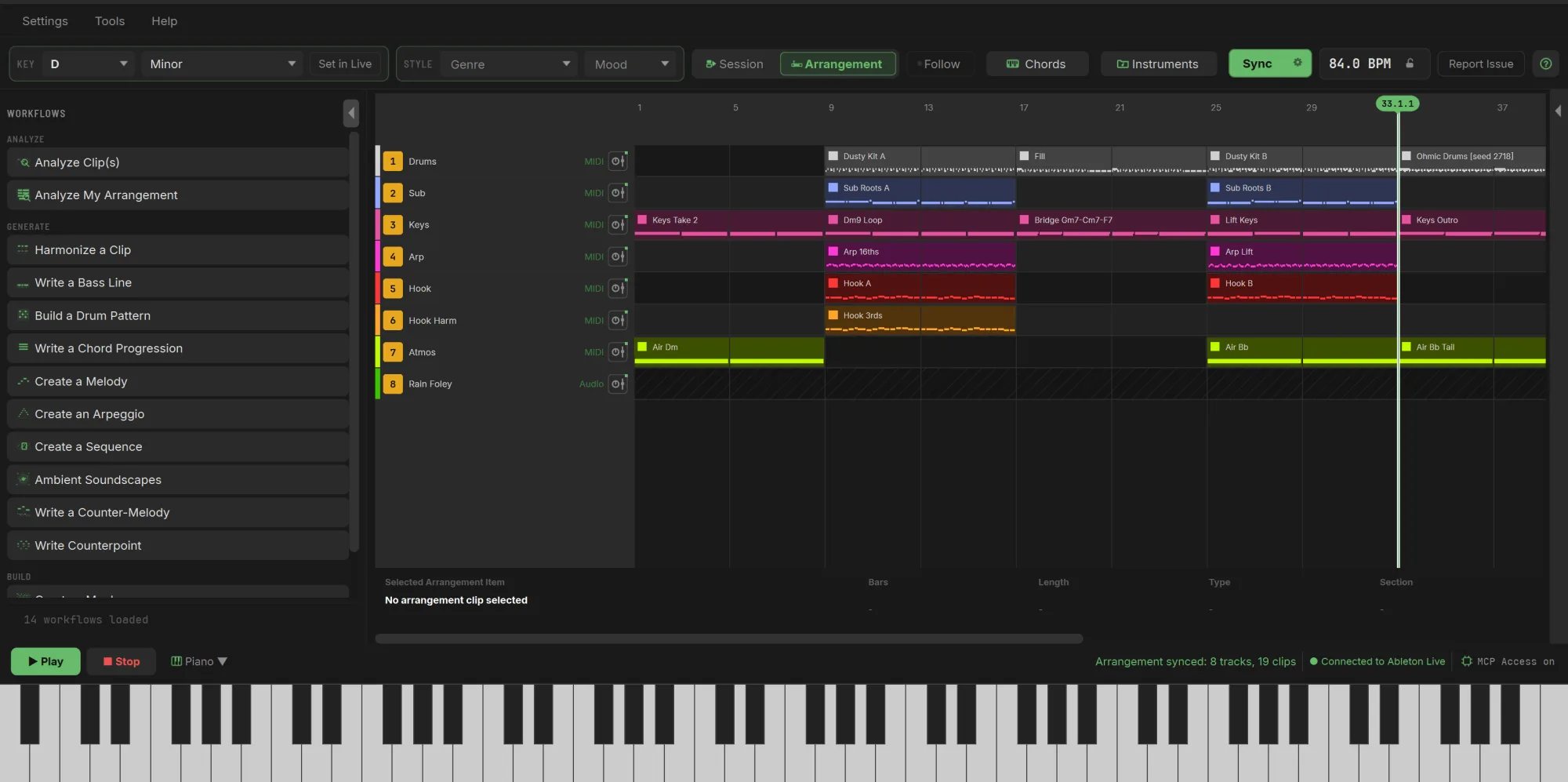
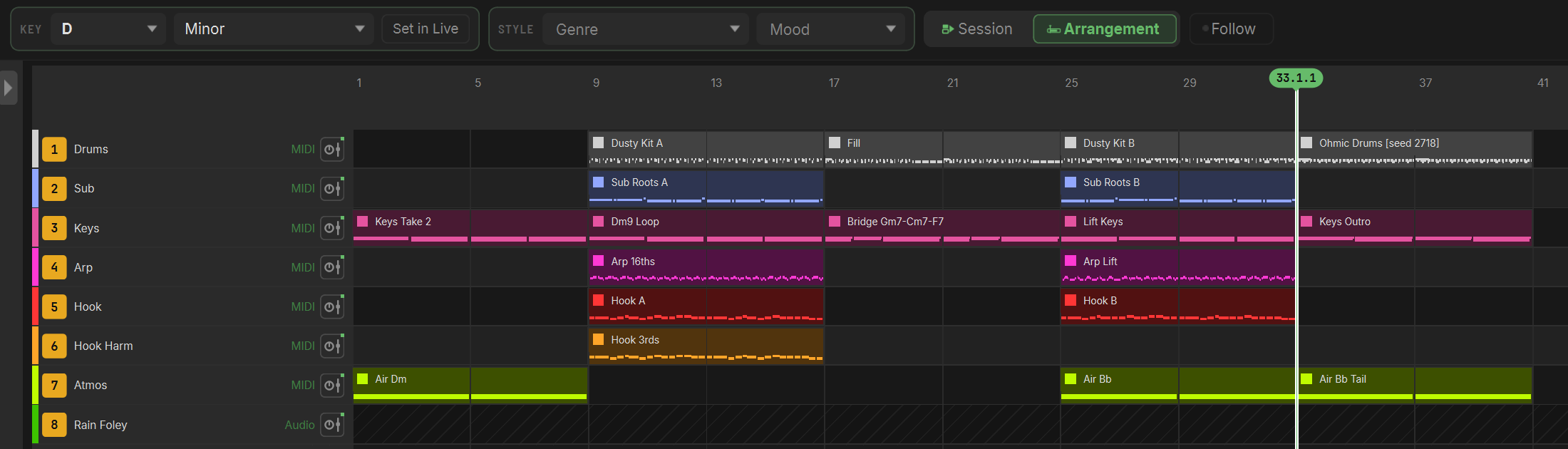
A live mirror of your set. Move, copy, and merge clips in Session, shift clips an octave in either view, launch scenes, and follow the playhead.
Sounds and device chains
Load instruments, effects, racks, and presets, reorder a track's devices, and choose what the Assistant may use.
Theory and analysis
Read a clip's chords into a Sketch, with Roman numerals. Analyze clips, a whole arrangement, or a progression's key changes.
MIDI and CC export
Export any MIDI clip, or bake filter sweeps, swells, pumps, and LFOs into it from 17 shapes.
Connect your way
Your own API key, a local model, the Claude Code or Codex agent you already use in the built-in Command line, or MCP Access.
Careful with your music
Clip and device-chain writes are read back from Live. Ohmic asks before the Assistant writes over a Session clip (once per request) or creates an Arrangement clip (once per chat).
Help built in
A setup wizard, the Help Assistant, guided tours, a connection health check, and a Report Issue window that fills in your system details.
Beta Founders price
$25 now instead of $49, and the first full release free when it arrives.
Built for the moment you get stuck.
You don't have to hand Ohmic your whole song. Most of the time you need one thing: a groove to start from, a chord you wouldn't have reached for, a line that answers yours, or a way into the B section. Ohmic brings that and gets out of the way.
A blank page
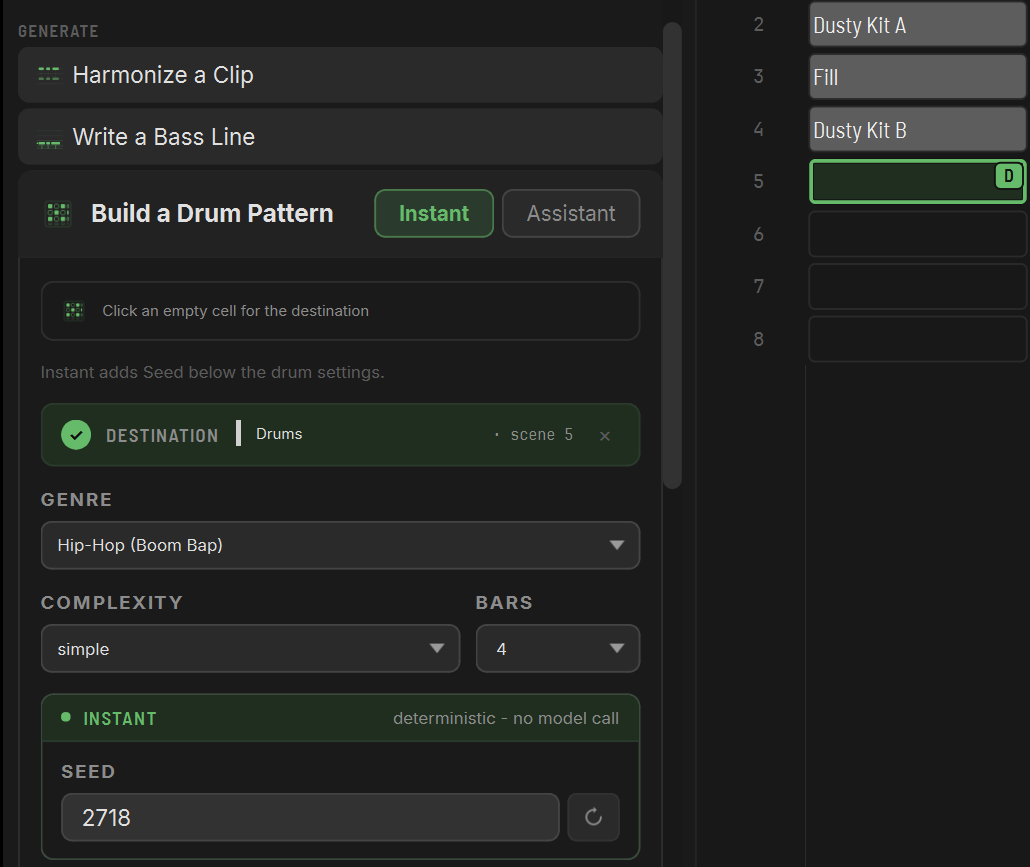
Start from a groove or a progression instead of a preset. Describe what you want to the Assistant, or let Instant write seeded drums, chords, arpeggios, and more into an empty Session cell or Arrangement range. With Instant, keep the seed and settings and you get the same notes again. Change the seed for a new idea.
Stuck mid-sketch
Drop your four bars into a Sketch and push them somewhere you wouldn't go on your own. Borrow a chord from the parallel mode, add a secondary dominant, swap in a substitute, or voice-lead the whole thing smoother. Five Sketches let you hear ideas side by side before anything reaches Live.

The B section
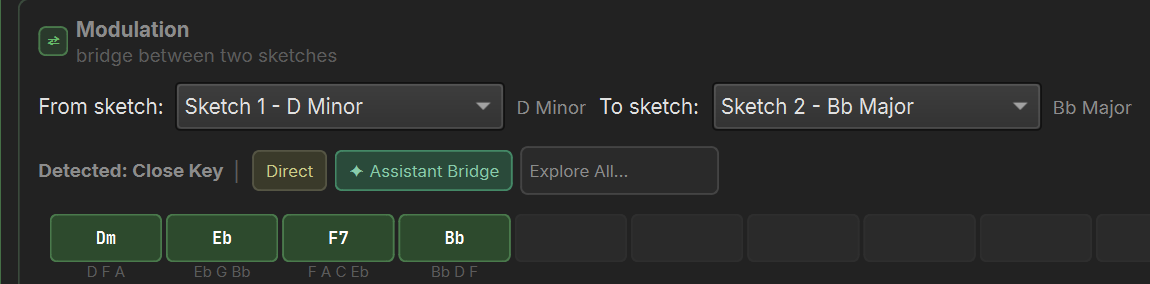
Set a destination key and Ohmic lights up the chords that belong to both keys, ranked by how hard they pull. Then the Modulation view offers bridge progressions between two Sketches, voiced and ready to write: a Direct move, 20 named templates such as The Cinematic Turn or The Dorian Lift, or a bridge from the Assistant.
Ask for it in plain words.
The Assistant reads your tracks, clips, and devices, then does the work in Live: it writes new parts, edits the ones you point at, loads sounds, builds out your set, and explains the theory behind it.
-
Ideas on request
Describe the part you want: genre, mood, feel, length, a clip to follow. Bass lines, drums, chords, melodies, pads, and full multitrack sketches.
“Write a syncopated bass line that locks to the kick.”
-
Edits to what you select
Select clips, a track header, or a range in the Arrangement and just say what to change. The Assistant knows what you picked, which view you're in, your locator names, and which clips a range overlaps.
“Make this more syncopated, and add a pickup into bar 5.”
-
Theory, explained
Ask why a chord pulls so hard, what mode a clip is in, or how to reach a new key. Answers come from your actual clips. It answers questions about Ableton Live too.
“Why does the Gm7 work as a pivot here?”
-
Sounds on your tracks
Finds instruments, effects, racks, presets, and plugins you haven't hidden from it, even from a note like “Vangelis-style brass pad”, and loads them onto the track you name.
“Put a warm electric piano on the Keys track.”
-
Device chains
Adds a device between two others, moves one, removes one, or swaps one out, and asks you to approve a move, removal, or swap before anything changes.
“Add a reverb after the EQ on the Hook track.”
-
Set building
Creates and names MIDI and audio tracks and scenes, and sets tempo, time signature, and Live's key and scale.
“Make four MIDI tracks: Drums, Bass, Keys, and Pad.”
-
Session and Arrangement
Writes and edits notes in clips, places new clips at a bar, repeats them across a range, and renames them. It is told to stay in the Session unless you ask for the Arrangement or are working there.
“Repeat the Hook A notes from bar 17 to bar 32.”
-
Automation in words
Describe a filter sweep, a swell, or a mod-wheel ramp. Ohmic draws the full curve and writes a notes-plus-CC MIDI file for you to drag into Live, so your clip is never touched.
“Add a filter sweep that opens up over the clip.”
-
Kept in key
Turn on key correction at Strict and Ohmic snaps every note the Assistant writes into your key. Neighbor Tones and Passing Tones let notes up to a half step or a whole step off the scale through. In a workflow, choose None to keep the key without limiting the request to one scale. Key correction, when on, still uses the main window's key and scale.
“A walking bass over Em, C, G, D.”
-
Your own producer
Write a prompt style in plain Markdown, like a lo-fi producer who prefers 7ths and 9ths or a teacher who explains every move, and the Assistant works through that lens. Create, copy, and switch styles from Settings.
“You specialize in jazz harmony and rich voicings.”
-
Watch it work
A cyan tint marks the clips and range you picked for it, and a spinning arc marks where it writes. Each action shows in the chat as it happens, and Stop cancels at any time.
-
Prompts you reuse
Saved Prompts for whole requests, Resend Last, arrow-key history, and Save Chat to keep a conversation as a Markdown file.
Fourteen workflows, one sidebar.
The writing workflows put MIDI into the spot you choose: an empty Session cell, or a bar range you drag in the Arrangement. Create Multitrack builds new tracks, and the two Analyze workflows answer in the chat. Every one runs with the Assistant. The ones marked Instant also run on your computer, in nine scales: Major, Minor, Harmonic Minor, Melodic Minor, Dorian, Phrygian, Lydian, Mixolydian, and Locrian. No LLM API key and no LLM token usage required.

Write a Chord Progression
Instant Assistant
A progression in your key with chord lengths from half a bar to 8 bars, or one that keeps the harmony of reference clips.

Harmonize a Clip
Instant Assistant
A second line in diatonic 3rds and 6ths, above or below the top line of the melody you choose. Key and scale can come from the melody itself.

Create an Arpeggio
Instant Assistant
Ten patterns from Up to Random, plus Auto, at rates from 1/32 to whole notes, from your chords or a new progression.

Create a Sequence
Instant Assistant
A motif repeated up or down, in key or by exact intervals, up to 16 times, with optional humanizing. No clip? It rolls a climbing, falling, arching, dipping, or zigzag motif for you.

Build a Drum Pattern
Instant Assistant
Instant picks from 84 grooves across 14 genres and three complexity levels, swung where the genre calls for it, mapped to General MIDI drums. The Assistant writes in any genre and mood you give it.

Ambient Soundscapes
Instant Assistant
Evolving textures shaped by Evolution and Density, over an optional bass, mid, high, or varied Drone.

Write a Bass Line
Assistant
Fingered, slap, synth, walking, or octave bass, from genre, mood, key, and length.

Create a Melody
Assistant
From scratch, or inspired by clips you select.

Write a Counter-Melody
Assistant
A second line that answers the one you wrote.

Write Counterpoint
Assistant
A part that follows voice-leading rules against your source.

Create a Mockup
Assistant
A quick multi-part sketch inside a single clip, layered by register.

Create Multitrack
Assistant
Bass, chords, melody, and drums across new tracks, in Session or starting at the playhead in the Arrangement.

Analyze Clip(s)
Assistant
A music theory analysis of the clips you select: key, scale, and chords, how the parts fit together, any key clashes, and suggestions to improve them.

Analyze My Arrangement
Assistant
A music theory analysis of the whole arrangement, or just the tracks you select: sections, key changes, and chords in Roman numerals, plus recommendations you can pick for the Assistant to write in.
Shape every run
- Key and scale follow the main window, or override them per workflow. A reference clip can set them instead.
- Genre and Mood come from the main Style controls, or override them per workflow. Type your own genre or mood for the Assistant, and Ohmic keeps it for next time.
- Bars (up to 512), a note range you can lock to a fixed span, note length limits, dynamics, and a No looping switch.
- Switch between Instant and Assistant without losing your settings.
- An Additional prompt for anything else, plus Workflow Extras: eight starter snippets like “Smooth voice leading” and your own saved ones.
Follow what's there
- Click clips to use as references and an empty cell as the destination. Ctrl-click (Cmd-click on Mac) adds more.
- In the Arrangement, drag a range on a MIDI track and the workflow fills exactly those bars.
- Instant treats the range as a hard limit and the Assistant is told to stay inside it: Ohmic never stretches or crops to fit, and short Instant results loop to fill it.
- Right-click a clip and choose Set as destination (overwrite) when you do want to replace it.
Reroll in place
- Run an Instant workflow again and it replaces only the clip it wrote in that spot.
- The seed goes in the clip name, like Ohmic Drums [seed 2718]. Same seed, same settings, same notes. Ohmic remembers which clips it wrote until you quit.
- Drum genres: House, Funk, Reggae (One Drop), Hip-Hop (Boom Bap), Rock, Metal, Trap, Bossa Nova, Country (Train Beat), Reggaeton (Dembow), Drum & Bass, Pop, Jazz (Swing), and Blues Shuffle.
Beta Founders price: $25, normally $49, with the first full release free. See what you get
Two ways to work.
Bring in the Assistant as your partner, or start with Instant and no Assistant setup at all. Use either, or both.
Assistant
Your partner for theory, ideas, and building out your set.
Where you'll find it
Connect it with your own API key, a local model, or your subscription. See the options
Instant
Runs locally. No LLM API key or LLM token usage.
Switch any of these to Instant
The same seed and settings give you the same notes every time. Harmonize needs no seed: the same melody always gets the same harmony.
Modulation bridges
A Direct move plus 20 named templates: 12 key changes and 8 modal shifts, voiced by Ohmic's own voice-leading engine.
Always local, with no model at all: the Chords window's palette, More Chords, Circle of Fifths, pivot highlighting, every Transform, Analyze Chords on a clip of block chords, chord preview, the Piano Roll's Voice Lead and Voicing, and MIDI and CC export.
A theory workbench wired to your set.
The Chords window is where harmony gets shaped. Every chord in your Sketches and Progression shows its symbol and its Roman numeral, so you always know what you're hearing and why it works.
Why it works: Gm7 belongs to both keys, iv7 in D Minor and vi7 in Bb Major. Cm7, F7, and Bbmaj7 then confirm Bb Major as ii7-V7-Imaj7.
-
Explore
The Palette lays out the chords in your key on each degree, across octaves: triads and 7ths everywhere, plus 9ths, 6ths, and sus chords wherever the scale allows them. In major and minor keys, More Chords adds borrowed chords and secondary dominants, plus sus colors in major keys. The Circle of Fifths shows how far each key is from yours: click a key to switch, or Ctrl-click (Cmd-click on Mac) to set a destination.
-
Sketches
Five pads of up to 64 chords each. Double-click or drag chords in, insert between cells, Alt-drop to replace one, copy a pad to compare the same idea in two keys, and Generate a fresh one with Instant or the Assistant.
-
Progression
Up to 128 chords, colored in key, borrowed, sus, or outside the key, with a plain-English tooltip on each. Find its key changes, then write it into Live as a Session clip or into the Arrangement at the song cursor.
Transforms
Key changes
- Set a destination key and pivot chords light up in three strengths, with a legend spelled in the destination's own scale. Swap the two keys in one click, or reset to the main window's key.
- Bridge two Sketches in different keys with a Direct move, one of 20 named templates, or an Assistant Bridge, in up to 16 bridge chords. Ohmic marks a Recommended template and an Alt Vibe, and the preview plays the bridge chords on their own. Send the whole passage to a Sketch or the Progression.
- Analyze Key(s) finds where a progression changes key, including Dorian, Phrygian, Lydian, and Mixolydian regions, and an Arrangement write splits at each key change.
Generate
- 1 to 16 chords, each half a bar to 8 bars long, centered on the octave you pick.
- Styles: Triads, 7ths, Extended, Open, Close, Drop 2, or no preference.
- Optional smooth voice leading. In Instant, the seed decides whether it resolves home or ends open.
- Or ask the Chords Assistant: it writes, reads, or clears any Sketch you name, and Analyze explains any Sketch or the Progression.
- The Chords window works in the nine Instant scales.
Hear it, write it
- Audition on nine built-in instruments: Upright Piano, Electric Piano, Organ, Synth Strings, Warm Pad, Pluck, Vibraphone, Choir Pad, and Brass Stab.
- A piano rail lights every note. Right-click a Sketch chord to set it to a triad, 7th, or 9th.
- Write to a chosen track's first empty slot (Ohmic adds a scene if it's full) or a pinned cell, and it asks before replacing a clip. Then open the Piano Roll to tie notes, voice-lead, or revoice the clip.
Learn the move, keep the music.
Ohmic started as a way to learn music theory. The melody, the feel, and the performance are yours. Ohmic helps with the parts that are hard to hear on your own, like a modal shift or the chord that gets you to a new key, and tells you why they work, so the move is in your hands next time.
Some producers will use it for one chord. Some will use it to build out a whole set. That choice is always yours.
Your whole set, mirrored.
Ohmic connects through Ohmic Bridge, a Remote Script the installer puts in place; you select it once in Live's Control Surface settings. It shows your Session and Arrangement as they are in Live, keeps them in sync, and the Assistant always knows your key and can read your tracks, clips, and tempo before it writes.
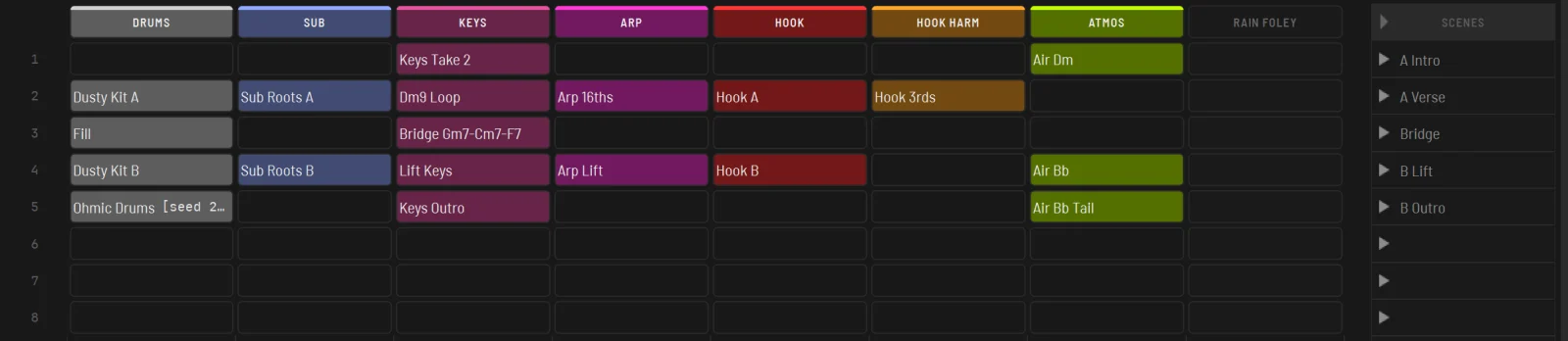
Session view
- Drag to move a clip, Ctrl-drag or Ctrl+C and Ctrl+V to copy.
- Merge clips into one, shift them an octave, rename, delete. Zoom the grid text and resize columns.
- Right-click Preview Clip for an editable Piano Roll: Tie Notes, Voice Lead, Voicing, Intelligent Voice Lead, and Undo that follows the clip when you move or copy it.
- Add MIDI tracks and scenes, delete tracks, launch whole scenes.
- Per-track footer: mute, stop the playing clip, open the device chain.
Arrangement view
- MIDI clips with their notes drawn in, audio and group tracks, locator flags, and a moving playhead with Follow.
- Zoom, scroll, and resize rows. Rename, delete, and shift clips an octave, and rename or delete tracks.
- Drag a bar range to aim a workflow or the Assistant at exactly those bars.
- Double-click a MIDI clip for a piano-roll preview.
Transport, tempo, and key
- Play and Stop, continuous Sync from every 1 to 30 seconds, and Tab to flip between Session and Arrangement.
- Drag or type the tempo, and lock it so the Assistant can't change it.
- An 88-key piano lights the Session clips you play from Ohmic, and in the Arrangement it lights each track in its own color, following the tracks you select and respecting mute and solo.
- Key and scale offer exactly the 35 scales in Live's own chooser, and Set in Live sends your choice to Live.
Sounds and device chains.
See what's on a track, change it, and decide which sounds the Assistant sees, without switching to Live.
Device chains
- Open any track's chain from its footer to see every device in order.
- Drag to reorder. Ohmic follows Live's rules: MIDI effects before the instrument, audio effects after it.
- Remove a device, or add one. If Live doesn't confirm a move, the old order comes straight back.
Device Picker
- Search and load built-in instruments, audio and MIDI effects onto a track.
- Your racks, drum racks, device presets, VST3 and Audio Unit presets, plugins, and Max for Live devices, too.
Instruments browser
- Choose which devices and presets the Assistant sees when it looks for a sound.
- Add a note like “dark bass rack” so it picks the right one. Notes follow a rack or preset file if you move or rename it, and the Assistant's device search forgives small typos.
Hear what's really there.
Ohmic names the harmony in any MIDI clip you right-click, spelled the way a musician would write it: a chord is Bb, not A#, when the key is F Major.
Roman numerals
- Numerals name the chord's real quality. In C Major, G7 is V7, Cmaj7 is Imaj7, and Bm7b5 is viiø7. In C Minor, the Eb chord is bIII.
On demand
- Analyze Clip(s) explains the keys, chords, and interesting moves in the clips you select, and suggests improvements.
- Analyze My Arrangement reads song structure, keys, and harmony across the set, and recommends what to add or strengthen.
- Right-click a MIDI clip in Session or Arrangement and choose Analyze Chords: Ohmic reads its chords into the Sketch you pick, instantly and locally. If it's an arpeggio, a sequence, or a melody with no block chords, Ohmic offers to send it to the Assistant to find the implied harmony.
Across a progression
- Analyze Key(s) marks each key region, with Global and Local readings of every chord.
- Regions you wrote in Sketches stay labeled Authored. Analysis never replaces them without asking, you can analyze one region on its own, and Undo takes any analysis back.
MIDI and CC export.
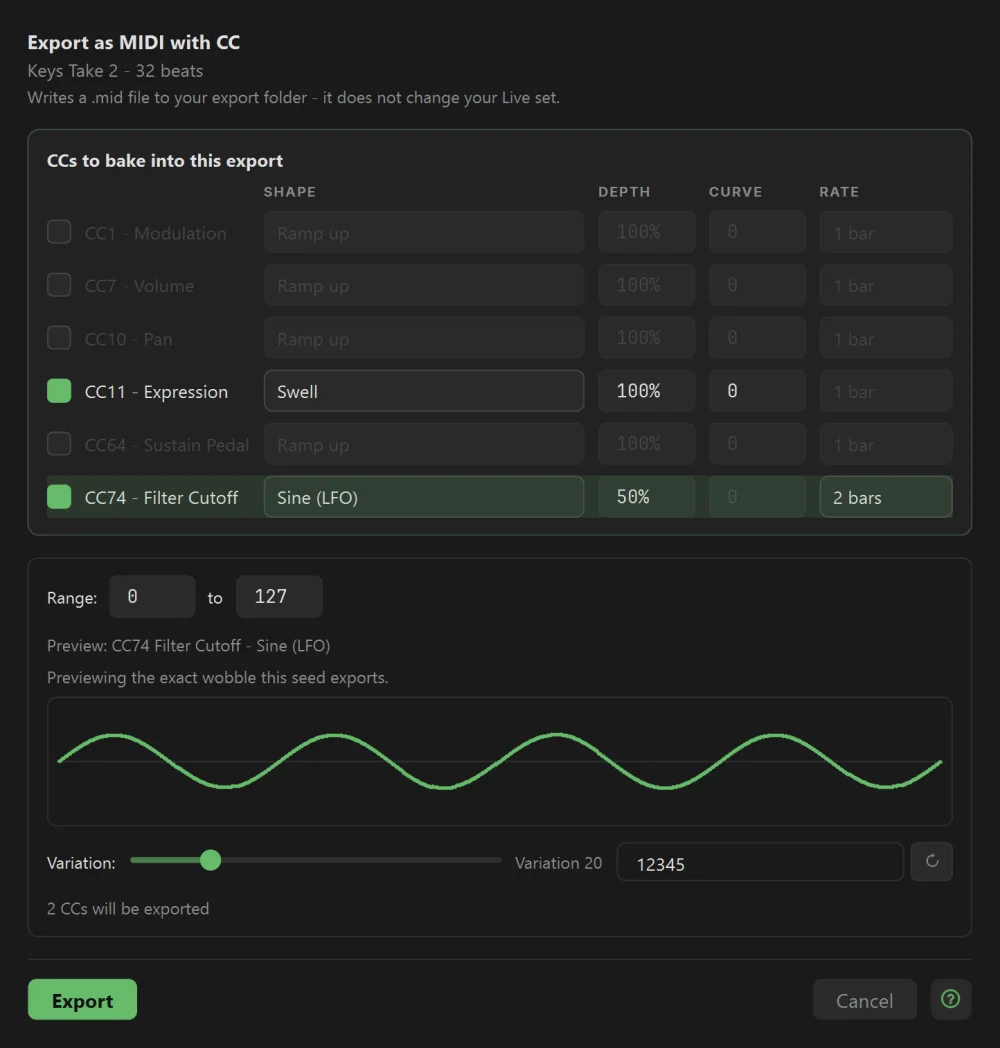
Right-click any MIDI clip in Session or Arrangement to export it as a MIDI file, or bake CC automation into it: the filter opening up, an expression swell, a volume fade, a sidechain-style pump.
Or describe the curve you need and the Assistant writes it for you, like “open the filter over the first 8 bars, then pull it back in the last bar.” It sets its own points on each CC you’ve allowed, joined smooth or straight, several CCs in one file. MCP Access clients can do the same.
- One-click presets, plus every shape on Filter Cutoff from a flyout.
- A Custom dialog for several CCs at once, each with its own shape, depth, curve, and rate in note values from 8 bars to 1/16, triplets included.
- A live preview of the exact curve, and Variation with a Seed for a hand-ridden feel you can reproduce.
- Right-click exports land in the export folder you choose, never overwriting an earlier one, and the chat log keeps a line naming each file and its seed. Your Live clip is never changed: drag the file into Live and it fills in the envelopes.
- Choose which CCs appear, and which ones the Assistant may automate: CC1, 7, 10, 11, 64, and 74 to start.
Connect the Assistant your way.
Pick the model you already pay for, run one on your own machine, or skip the built-in Assistant entirely. Instant features never need any of it.
Your own API key
- Google Gemini, Anthropic Claude, OpenAI, or OpenRouter.
- Keys are kept in Windows Credential Manager or the macOS Keychain, never in a file.
- Pick a reasoning level when the model offers one, or type a brand-new model name. New models can arrive without an app update.
A local or custom model
- Ollama, LM Studio 0.4 or newer, or any OpenAI-compatible endpoint. Remote servers need HTTPS, and a plain-HTTP private IP address on your home network, like 192.168.1.20, asks you first.
- Ohmic lists the models your server offers, and Validate checks a model can use Ohmic's tools. Keep several Custom profiles.
Your subscription
- A built-in Command line runs Claude Code, Codex, or another agent you already use. Workflows and the Chords window can hand it a ready-made prompt, which you preview and allow once or for the session, and paste or send automatically.
- MCP Access lets Claude Desktop, Claude Code, Codex (with your ChatGPT plan), or any MCP client work in Ohmic. It listens only on your computer and needs a pairing token you can rotate. Copyable setup for each client, instruction files for Codex and Claude Code, and a guided setup tour get you connected. Clients can even edit your Sketches and Progression.
Built-in limits keep the built-in Assistant's costs in view: a token budget, a cap on steps per request, and a usage bar for the session. Your provider's own dashboard stays the source of truth for billing.
Careful with your music.
Ohmic treats your set like it's the only copy, because it is.
- Writes where you point it: an empty cell, a range you select, or the track you name.
- Asks before it writes a new clip over one it didn't write, and for the Assistant, one yes covers the rest of that reply. A reroll replaces only its own clip, and if the new write fails, Ohmic puts the old clip's notes, length, and name back whenever it can and tells you if it can't.
- Reads Live back after clip and device-chain writes. If Live doesn't confirm it, Ohmic doesn't claim it.
- Buttons say what they do, like Delete or Overwrite, and on almost every box Cancel is the default. An “Always allow” checkbox lasts only until you relaunch.
- The Assistant asks before it applies device-chain changes, changes Live's scale, or creates, fills, renames, or deletes Arrangement clips, and shows what will change. One yes covers the rest of that chat's Arrangement edits. MCP Access clients get their own confirmation prompts unless you choose to trust them, and Ohmic reads their writes back from Live either way.
- Lock the tempo so neither the Assistant nor an MCP client can change it.
- Talks to Live on your own computer only, and only one copy of Ohmic can connect at a time.
Help when you need it.
From first launch to a bug report, Ohmic explains itself.
Setup wizard
A few short steps: choose a provider, add an LLM API key if you need one, pick a model, and connect to Live.
Help Assistant
Ask how anything in Ohmic works. It answers from the full user guide, in its own window, using your chosen model.
Guided tours
Step-by-step walkthroughs from the ? button that dim the window and light the control to use next, including the Chords window and MCP Access setup.
Health check
Connection Health Check and Feature Availability show what's working and what to fix.
Report Issue
Turns red when a crash log appears. View or delete logs, and build a report you can paste into the Ohmic Discord.
Fits your screen
Scale the whole interface from 75% to 150%. Start Ohmic before or after Live and it connects on its own.
Beta Founders
$25 Normal price $49
For a limited time. Beta Founders get the first full release free when it's available.
Buy Ohmic for $25What you need
- Ableton Live
- Required: Live 12, any edition. Ohmic has been tested only with Live 12.
- Windows
- Windows 11. The installer sets up Ohmic Bridge and needs no admin rights.
- macOS
- Apple silicon Macs only, from a notarized installer. Intel Macs are not supported.
- Assistant
- Optional. Use an API key, a local model, or your Claude, OpenAI, or other subscription. Instant features need no LLM API key and no LLM token usage.
Questions
Will Ohmic write my songs for me?
Only as much as you ask it to. Some people use it for one progression or a key change, others to build out a whole arrangement. Nothing reaches Live until you ask: pick a spot and press Run, write from the Chords window, or ask the Assistant.
Is it just for chords?
No. It writes drums, bass lines, melodies, counter-melodies, arpeggios, ambient textures, and whole multitrack sketches, loads sounds, edits device chains, analyzes your clips and arrangement, and exports MIDI with CC automation. The Chords window is one part of it.
Do I need an LLM API key or subscription?
No. Six Instant workflows, the Chords window's tools and Instant Generate, Analyze Chords on a clip of block chords, and MIDI export all run on your computer, with no LLM API key and no LLM token usage. The Assistant is optional: use your own LLM API key, a local model, or your Claude, OpenAI, or other subscription through Ohmic's Command line or MCP Access.
What can the Assistant do?
It writes and edits parts from a plain-language brief, explains theory using your own clips, loads instruments, effects, and presets onto tracks, edits device chains, creates tracks and scenes, sets tempo, time signature, and key, writes clips in Session or Arrangement, and turns automation you describe into a MIDI file.
Does it work with my plugins?
Yes, for the ones you approve. Only Live's built-in devices are approved at first; tick the rest in the Instruments browser. Then the Device Picker and the Assistant can load plugins, and VST3 or Audio Unit presets you've saved to Live's User Library, along with your racks and Max for Live devices.
Where does my data go when I use the Assistant?
Straight from your computer to the provider you pick, under that provider's own privacy terms. With a local model running on your computer, it stays there. API keys are kept in Windows Credential Manager or the macOS Keychain. Instant features make no LLM calls and use no LLM tokens.
How do I install it?
Both installers include Ohmic Bridge. On Windows, run the installer. On a Mac, open the installer, drag Ohmic to Applications, and let Ohmic install Bridge when it first opens. Then choose Ohmic_Bridge as a Control Surface in Live's settings, and Ohmic connects to your set. Upgrading keeps your settings, LLM API keys, and saved prompts.
Can it mess up my set?
Ohmic writes into the empty cell or range you choose and checks Live after each clip write. It asks before putting a new clip over one it didn't write, and the Assistant asks before applying device-chain changes, changing Live's scale, or creating, filling, renaming, or deleting Arrangement clips. For the Assistant, one yes covers the rest of that reply's overwrites and that chat's Arrangement edits. Run an Instant workflow again in the same spot and it replaces only the clip it wrote there.
What does Beta mean, and what do Founders get?
Ohmic works today and is still being polished and extended before its first full release. Beta Founders pay $25 now instead of $49, and get that first full release free when it's available.
Bring Ohmic into your next session.
Beta Founders pay $25 instead of $49 and get the first full release free. Windows 11 and Apple silicon Macs, with Ableton Live.